From the Canyon Edge -- :-Dustin

Tuesday, September 9, 2014

Dream a little dream (in a dream within another dream) with me!

What would you say if I told you, that you could continuously upload your own Software-as-a-Service  (SaaS) web apps into an open source Platform-as-a-Service (PaaS) framework, running on top of an open source Infrastructure-as-a-Service (IaaS) cloud, deployed on an open source Metal-as-a-Service provisioning system, autonomically managed by an open source Orchestration-Service… right now, today?

“An idea is resilient. Highly contagious. Once an idea has taken hold of the brain it's almost impossible to eradicate.”

“Now, before you bother telling me it's impossible…”

“No, it's perfectly possible. It's just bloody difficult.” 

Perhaps something like this...

“How could I ever acquire enough detail to make them think this is reality?”

“Don’t you want to take a leap of faith???”
Sure, let's take a look!

Okay, this looks kinda neat, what is it?

This is an open source Java Spring web application, called Spring-Music, deployed as an app, running inside of Linux containers in CloudFoundry


Cloud Foundry?

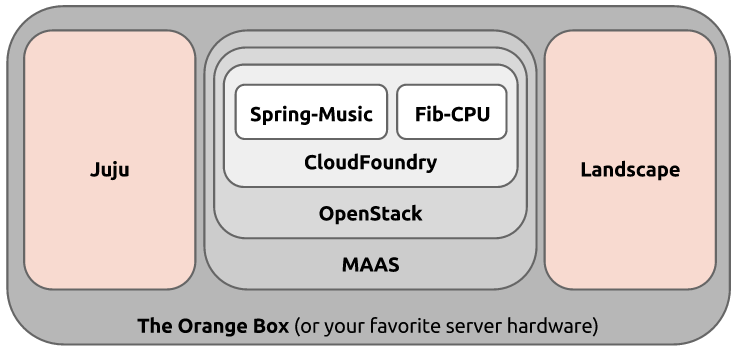
CloudFoundry is an open source Platform-as-a-Service (PAAS) cloud, deployed into Linux virtual machine instances in OpenStack, by Juju.


OpenStack?

Juju?

OpenStack is an open source Infrastructure-as-a-Service (IAAS) cloud, deployed by Juju and Landscape on top of MAAS.

Juju is an open source Orchestration System that deploys and scales complex services across many public clouds, private clouds, and bare metal servers.

Landscape?

MAAS?

Landscape is a systems management tool that automates software installation, updates, and maintenance in both physical and virtual machines. Oh, and it too is deployed by Juju.

MAAS is an open source bare metal provisioning system, providing a cloud-like API to physical servers. Juju can deploy services to MAAS, as well as public and private clouds.

"Ready for the kick?"

If you recall these concepts of nesting cloud technologies...

These are real technologies, which exist today!

These are Software-as-a-Service  (SaaS) web apps served by an open source Platform-as-a-Service (PaaS) framework, running on top of an open source Infrastructure-as-a-Service (IaaS) cloud, deployed on an open source Metal-as-a-Service provisioning system, managed by an open source Orchestration-Service.

Spring Music, served by CloudFoundry, running on top of OpenStack, deployed on MAAS, managed by Juju and Landscape!

“The smallest seed of an idea can grow…”

Oh, and I won't leave you hanging...you're not dreaming!


:-Dustin

Wednesday, September 3, 2014

OpenStack Austin Meetup, with an Orange Box and Home Brew Beer!


In case you missed the recent Cloud Austin MeetUp, you have another chance to see the Ubuntu Orange Box live and in action here in Austin!

This time, we're at the OpenStack Austin MeetUp, next Wednesday, September 10, 2014, at 6:30pm at Tech Ranch Austin, 9111 Jollyville Rd #100, Austin, TX!

If you join us, you'll witness all of OpenStack Ice House, deployed in minutes to real hardware. Not an all-in-one DevStack; not a minimum viable set of components.  Real, rich, production-quality OpenStack!  Ceilometer, Ceph, Cinder, Glance, Heat, Horizon, Keystone, MongoDB, MySQL, Nova, NTP, Quantum, and RabbitMQ -- intelligently orchestrated and rapidly scaled across 10 physical servers sitting right up front on the podium.  Of course, we'll go under the hood and look at how all of this comes together on the fabulous Ubuntu Orange Box.

And like any good open source software developer, I generally like to make things myself, and share them with others.  In that spirit, I'll also bring a couple of growlers of my own home brewed beer, Ubrewtu ;-)  Free as in beer, of course!
Cheers,Dustin

Friday, August 22, 2014

Call for Testing: Docker 1.0.1 in Ubuntu 14.04 LTS (Trusty)


Docker 1.0.1 is available for testing, in Ubuntu 14.04 LTS!

Docker 1.0.1 has landed in the trusty-proposed archive, which we hope to SRU to trusty-updates very soon.  We would love to have your testing feedback, to ensure both upgrades from Docker 0.9.1, as well as new installs of Docker 1.0.1 behave well, and are of the highest quality you have come to expect from Ubuntu's LTS  (Long Term Stable) releases!  Please file any bugs or issues here.

Moreover, this new version of the Docker package now installs the Docker binary to /usr/bin/docker, rather than /usr/bin/docker.io in previous versions. This should help Ubuntu's Docker package more closely match the wealth of documentation and examples available from our friends upstream.

A big thanks to Paul Tagliamonte, James Page, Nick Stinemates, Tianon Gravi, and Ryan Harper for their help upstream in Debian and in Ubuntu to get this package updated in Trusty!  Also, it's probably worth mentioning that we're targeting Docker 1.1.2 (or perhaps 1.2.0) for Ubuntu 14.10 (Utopic), which will release on October 23, 2014.

Here are a few commands that might help your testing...

Check What Candidate Versions are Available

$ sudo apt-get update
$ apt-cache show docker.io | grep ^Version:

If that shows 0.9.1~dfsg1-2 (as it should), then you need to enable the trusty-proposed pocket.

$ echo "deb http://archive.ubuntu.com/ubuntu/ trusty-proposed universe" | sudo tee -a /etc/apt/sources.list
$ sudo apt-get update
$ apt-cache show docker.io | grep ^Version:

And now you should see the new version, 1.0.1~dfsg1-0ubuntu1~ubuntu0.14.04.1, available (probably in addition to 1.0.1~dfsg1-0ubuntu1~ubuntu0.14.04.1).

Upgrades

Check if you already have Docker installed, using:

$ dpkg -l docker.io

If so, you can simply upgrade.

$ sudo apt-get upgrade

And now, you can check your Docker version:

$ sudo dpkg -l docker.io | grep -m1 ^ii | awk '{print $3}'
0.9.1~dfsg1-2

New Installations

You can simply install the new package with:

$ sudo apt-get install docker.io

And ensure that you're on the latest version with:

$ dpkg -l docker.io | grep -m1 ^ii | awk '{print $3}'
1.0.1~dfsg1-0ubuntu1~ubuntu0.14.04.1

Running Docker

If you're already a Docker user, you probably don't need these instructions.  But in case you're reading this, and trying Docker for the first time, here's the briefest of quick start guides :-)

$ sudo docker pull ubuntu
$ sudo docker run -i -t ubuntu /bin/bash

And now you're running a bash shell inside of an Ubuntu Docker container.  And only bash!

root@1728ffd1d47b:/# ps -ef
UID        PID  PPID  C STIME TTY          TIME CMD
root         1     0  0 13:42 ?        00:00:00 /bin/bash
root         8     1  0 13:43 ?        00:00:00 ps -ef

If you want to do something more interesting in Docker, well, that's whole other post ;-)

:-Dustin

Thursday, August 14, 2014

(Re-)Introducing JeOS -- Just Enough OS, aka Ubuntu Core


Lean.  Agile.  Svelte.  Lithe.  Free.

That's how we roll our operating systems in this modern, bountiful era of broadly deployed virtual machines, densely packed with system containers.

Linux, and more generally free software, is a natural fit in this model where massive scale is the norm.  And particularly Ubuntu (with its solid Debian base), is perfectly suited to this brave new world.

Introduced in Ubuntu 8.04 LTS (Hardy) -- November 19, 2007, in fact -- JeOS (pronounced, "juice") was the first of its kind.  An absolutely bare minimal variant of the Ubuntu Server, tailored to perfection for virtual machines and appliances.  Just enough OS.

Taken aback, I overheard a technical executive at a Fortune 50 company say this week:
"What ever happened to that Ubuntu JeOS thing?  We keep looking at CoreOS and Atomic, but what we really want is just a bare minimal Ubuntu server."
Somehow, somewhere along the line, an important message a got lost.  I hope we can correct that now...

JeOS has been here all along, in fact.  You've been able to deploy a daily, minimal Ubuntu image, all day, every single day for most of the the last decade.  Sure, it changed names to Ubuntu Core along the way, but it's still the same sleek little beloved ubuntu-minimal distribution.

"How minimal?", you ask...

63 MB compressed, to be precise.

Did you get that?

That's 63 MB, including a package management system, with one-line, apt-get access to over 30,000 freely available packages across the Ubuntu universe.

That's pretty darn small.  Much smaller than say, 165 MB or 268 MB (which, to be fair, includes a bit more of an operating system -- much closer to say the standard Ubuntu Cloud Image, which is a 176 MB root tarball, or with kernel at 243 MB).

"How useful could such a small image actually be, in practice?", you might ask...

Ask any Docker user, for starters.  Docker's base Ubuntu image has been downloaded over 775,260 to date.  And this image is built directly from the Ubuntu Core amd64 tarball.

Oh, and guess what else?  Ubuntu Core is available for more than just the amd64 architecture!  It's also available for i386, armhf, arm64, powerpc, and ppc64el.  Which is pretty cool, particularly for embedded systems.

So next time you're looking for just enough operating system, just look to the core.  Ubuntu Core.  There is truly no better starting point ;-)

Enjoy,
:-Dustin

Tuesday, August 12, 2014

Learn Byobu in 10 minutes while listening to Mozart


If you're interested in learning how to more effectively use your terminal as your integrated devops environment, consider taking 10 minutes and watching this video while enjoying the finale of Mozart's Symphony No. 40Allegro Assai (part of which is rumored to have inspired Beethoven's 5th).

I'm often asked for a quick-start guide, to using Byobu effectively.  This wiki page is a decent start, as is the manpage, and the various links on the upstream website.  But it seems that some of the past screencast videos have had the longest lasting impressions to Byobu users over the years.

I was on a long, international flight from Munich to Newark this past Saturday with a bit of time on my hands, and I cobbled together this instructional video.    That recent international trip to Nuremberg inspired me to rediscover Mozart, and I particularly like this piece, which Mozart wrote in 1788, but sadly never heard performed.  You can hear it now, and learn how to be more efficient in command line environments along the way :-)


Enjoy!
:-Dustin

Thursday, July 31, 2014

Ubuntu OpenStack on an Orange Box, Live Demo at the Cloud Austin Meetup, August 19th


I hope you'll join me at Rackspace on Tuesday, August 19, 2014, at the Cloud Austin Meetup, at 6pm, where I'll use our spectacular Orange Box to deploy Hadoop, scale it up, run a terasort, destroy it, deploy OpenStack, launch instances, and destroy it too.  I'll talk about the hardware (the Orange Box, Intel NUCs, Managed VLAN switch), as well as the software (Ubuntu, OpenStack, MAAS, Juju, Hadoop) that makes all of this work in 30 minutes or less!

Be sure to RSVP, as space is limited.

http://www.meetup.com/CloudAustin/events/194009002/

Cheers,
Dustin

Thursday, July 10, 2014

Scalable, Parallel Video Transcoding on Ubuntu

Transcoding video is a very resource intensive process.

It can take many minutes to process a small, 30-second clip, or even hours to process a full movie.  There are numerous, excellent, open source video transcoding and processing tools freely available in Ubuntu, including libav-toolsffmpegmencoder, and handbrake.  Surprisingly, however, none of those support parallel computing easily or out of the box.  And disappointingly, I couldn't find any MPI support readily available either.

I happened to have an Orange Box for a few days recently, so I decided to tackle the problem myself, and develop a scalable, parallel video transcoding solution myself.  I'm delighted to share the result with you today!

When it comes to commercial video production, it can take thousands of machines, hundreds of compute hours to render a full movie.  I had the distinct privilege some time ago to visit WETA Digital in Wellington, New Zealand and tour the render farm that processed The Lord of the Rings triology, Avatar, and The Hobbit, etc.  And just a few weeks ago, I visited another quite visionary, cloud savvy digital film processing firm in Hollywood, called Digital Film Tree.

Windows and Mac OS may be the first platforms that come to mind, when you think about front end video production, Linux is far more widely used for batch video processing, and with Ubuntu, in particular, being extensively at both WETA Digital and Digital Film Tree, among others.

While I could have worked with any of a number of tools, I settled on avconv (the successor(?) of ffmpeg), as it was the first one that I got working well on my laptop, before scaling it out to the cluster.

I designed an approach on my whiteboard, in fact quite similar to some work I did parallelizing and scaling the john-the-ripper password quality checker.

At a high level, the algorithm looks like this:
  1. Create a shared network filesystem, simultaneously readable and writable by all nodes
  2. Have the master node split the work into even sized chunks for each worker
  3. Have each worker process their segment of the video, and raise a flag when done
  4. Have the master node wait for each of the all-done flags, and then concatenate the result
And that's exactly what I implemented that in a new transcode charm and transcode-cluster bundle.  It provides linear scalability and performance improvements, as you add additional units to the cluster.  A transcode job that takes 24 minutes on a single node, is down to 3 minutes on 8 worker nodes in the Orange Box, using Juju and MAAS against physical hardware nodes.


For the curious, the real magic is in the config-changed hook, which has decent inline documentation.


The trick, for anyone who might make their way into this by way of various StackExchange questions and (incorrect) answers, is in the command that splits up the original video (around line 54):

avconv -ss $start_time -i $filename -t $length -s $size -vcodec libx264 -acodec aac -bsf:v h264_mp4toannexb -f mpegts -strict experimental -y ${filename}.part${current_node}.ts

And the one that puts it back together (around line 72):

avconv -i concat:"$concat" -c copy -bsf:a aac_adtstoasc -y ${filename}_${size}_x264_aac.${format}

I found this post and this documentation particularly helpful in understanding and solving the problem.

In any case, once deployed, my cluster bundle looks like this.  8 units of transcoders, all connected to a shared filesystem, and performance monitoring too.


I was able to leverage the shared-fs relation provided by the nfs charm, as well as the ganglia charm to monitor the utilization of the cluster.  You can see the spikes in the cpu, disk, and network in the graphs below, during the course of a transcode job.


For my testing, I downloaded the movie Code Rushfreely available under the CC-BY-NC-SA 3.0 license.  If you haven't seen it, it's an excellent documentary about the open source software around Netscape/Mozilla/Firefox and the dotcom bubble of the late 1990s.

Oddly enough, the stock, 746MB high quality MP4 video doesn't play in Firefox, since it's an mpeg4 stream, rather than H264.  Fail.  (Yes, of course I could have used mplayer, vlc, etc., that's not the point ;-)


Perhaps one of the most useful, intriguing features of HTML5 is it's support for embedding multimedia, video, and sound into webpages.  HTML5 even supports multiple video formats.  Sounds nice, right?  If it only were that simple...  As it turns out, different browsers have, and lack support for the different formats.  While there is no one format to rule them all, MP4 is supported by the majority of browsers, including the two that I use (Chromium and Firefox).  This matrix from w3schools.com illustrates the mess.

http://www.w3schools.com/html/html5_video.asp

The file format, however, is only half of the story.  The audio and video contents within the file also have to be encoded and compressed with very specific codecs, in order to work properly within the browsers.  For MP4, the video has to be encoded with H264, and the audio with AAC.

Among the various brands of phones, webcams, digital cameras, etc., the output format and codecs are seriously all over the map.  If you've ever wondered what's happening, when you upload a video to YouTube or Facebook, and it's a while before it's ready to be viewed, it's being transcoded and scaled in the background. 

In any case, I find it quite useful to transcode my videos to MP4/H264/AAC format.  And for that, a scalable, parallel computing approach to video processing would be quite helpful.

During the course of the 3 minute run, I liked watching the avconv log files of all of the nodes, using Byobu and Tmux in a tiled split screen format, like this:


Also, the transcode charm installs an Apache2 webserver on each node, so you can expose the service and point a browser to any of the nodes, where you can find the input, output, and intermediary data files, as well as the logs and DONE flags.


Once the job completes, I can simply click on the output file, Code_Rush.mp4_1280x720_x264_aac.mp4, and see that it's now perfectly viewable in the browser!


In case you're curious, I have verified the same charm with a couple of other OGG, AVI, MPEG, and MOV input files, too.


Beyond transcoding the format and codecs, I have also added configuration support within the charm itself to scale the video frame size, too.  This is useful to take a larger video, and scale it down to a more appropriate size, perhaps for a phone or tablet.  Again, this resource intensive procedure perfectly benefits from additional compute units.


File format, audio/video codec, and frame size changes are hardly the extent of video transcoding workloads.  There are hundreds of options and thousands of combinations, as the manpages of avconv and mencoder attest.  All of my scripts and configurations are free software, open source.  Your contributions and extensions are certainly welcome!

In the mean time, I hope you'll take a look at this charm and consider using it, if you have the need to scale up your own video transcoding ;-)

Cheers,
Dustin

Printfriendly