From the Canyon Edge -- :-Dustin
Showing posts with label juju. Show all posts

Monday, August 21, 2017

Bare Metal Kubernetes: More Containers, Less Overhead

Earlier this month, I spoke at ContainerDays, part of the excellent DevOpsDays series of conferences -- this one in lovely Portland, Oregon.

I gave a live demo of Kubernetes running directly on bare metal.  I was running it on an 11-node Ubuntu Orange Box -- but I used the exact same tools Canonical's world class consulting team uses to deploy Kubernetes onto racks of physical machines.
You see, the ability to run Kubernetes on bare metal, behind your firewall is essential to the yin-yang duality of Cloud Native computing.  Sometimes, what you need is actually a Native Cloud.
Deploying Kubernetes into virtual machines in the cloud is rather easy, straightforward, with dozens of tools now that can handle that.

But there's only one tool today, that can deploy the exact same Kubernetes to AWS, Azure, GCE, as well as VMware, OpenStack, and bare metal machines.  That tools is conjure-up, which acts as a command line front end to several essential Ubuntu tools: MAAS, LXD, and Juju.

I don't know if the presentation was recorded, but I'm happy to share with you my slides for download, and embedded here below.  There are a few screenshots within that help convey the demo.


Cheers,
Dustin

Monday, July 20, 2015

Prime Time: Docker, Juju, and Snappy Ubuntu Core


As you probably remember from grade school math class, primes are numbers that are only divisible by 1 and themselves.  2, 3, 5, 7, and 11 are the first 5 prime numbers, for example.

Many computer operations, such as public-key cryptography, depends entirely on prime numbers.  In fact, RSA encryption, invented in 1978, uses a modulo of a product of two very large primes for encryption and decryption.  The security of asymmetric encryption is tightly coupled with the computational difficulty in factoring large numbers.  I actually use prime numbers as the status update intervals in Byobu, in order to improve performance and distribute the update spikes.

Euclid proved that there are infinitely many prime numbers around 300 BC.  But the Prime Number Theorem (proven in the 19th century) says that the probability of any number is prime is inversely proportional to its number of digits.  That means that larger prime numbers are notoriously harder to find, and it gets harder as they get bigger!
What's the largest known prime number in the world?

Well, it has 17,425,170 decimal digits!  If you wanted to print it out, size 11 font, it would take 6,543 pages -- or 14 reams of paper!

That number is actually one less than a very large power of 2.  257,885,161-1.  It was discovered by Curtis Cooper on January 25, 2013, on an Intel Core2 Duo.

Actually, each of the last 14 record largest prime numbers discovered (between 1996 and today) have been of that form, 2P-1.  Numbers of that form are called Mersenne Prime Numbers, named after Friar Marin Mersenne, a French priest who studied them in the 1600s.


Friar Mersenne's work continues today in the form of the Great Internet Mersenne Prime Search, and the mprime program, which has been used to find those 14 huge prime numbers since 1996.

mprime is a massive parallel, cpu scavenging utility, much like SETI@home or the Protein Folding Project.  It runs in the background, consuming resources, working on its little piece of the problem.  mprime is open source code, and also distributed as a statically compiled binary.  And it will make a fine example of how to package a service into a Docker container, a Juju charm, and a Snappy snap.


Docker Container

First, let's build the Docker container, which will serve as our fundamental building block.  You'll first need to download the mprime tarball from here.  Extract it, and the directory structure should look a little like this (or you can browse it here):

├── license.txt
├── local.txt
├── mprime
├── prime.log
├── prime.txt
├── readme.txt
├── results.txt
├── stress.txt
├── undoc.txt
├── whatsnew.txt
└── worktodo.txt

And then, create a Dockerfile, that copies the files we need into the image.  Here's our example.

FROM ubuntu
MAINTAINER Dustin Kirkland email@example.com
COPY ./mprime /opt/mprime/
COPY ./license.txt /opt/mprime/
COPY ./prime.txt /opt/mprime/
COPY ./readme.txt /opt/mprime/
COPY ./stress.txt /opt/mprime/
COPY ./undoc.txt /opt/mprime/
COPY ./whatsnew.txt /opt/mprime/
CMD ["/opt/mprime/mprime", "-w/opt/mprime/"]

Now, build your Docker image with:

$ sudo docker build .
Sending build context to Docker daemon 36.02 MB
Sending build context to Docker daemon 
Step 0 : FROM ubuntu
...
Successfully built de2e817b195f

Then publish the image to Dockerhub.

$ sudo docker push kirkland/mprime

You can see that image, which I've publicly shared here: https://registry.hub.docker.com/u/kirkland/mprime/


Now you can run this image anywhere you can run Docker.

$ sudo docker run -d kirkland/mprime

And verify that it's running:

$ sudo docker ps
CONTAINER ID        IMAGE                    COMMAND                CREATED             STATUS              PORTS               NAMES
c9233f626c85        kirkland/mprime:latest   "/opt/mprime/mprime    24 seconds ago      Up 23 seconds                           furious_pike     

Juju Charm

So now, let's create a Juju Charm that uses this Docker container.  Actually, we're going to create a subordinate charm.  Subordinate services in Juju are often monitoring and logging services, things that run along side primary services.  Something like mprime is a good example of something that could be a subordinate service, attached to one or many other services in a Juju model.

Our directory structure for the charm looks like this (or you can browse it here):

└── trusty
    └── mprime
        ├── config.yaml
        ├── copyright
        ├── hooks
        │   ├── config-changed
        │   ├── install
        │   ├── juju-info-relation-changed
        │   ├── juju-info-relation-departed
        │   ├── juju-info-relation-joined
        │   ├── start
        │   ├── stop
        │   └── upgrade-charm
        ├── icon.png
        ├── icon.svg
        ├── metadata.yaml
        ├── README.md
        └── revision
3 directories, 15 files

The three key files we should look at here are metadata.yaml, hooks/install and hooks/start:

$ cat metadata.yaml
name: mprime
summary: Search for Mersenne Prime numbers
maintainer: Dustin Kirkland 
description: |
  A Mersenne prime is a prime of the form 2^P-1.
  The first Mersenne primes are 3, 7, 31, 127
  (corresponding to P = 2, 3, 5, 7).
  There are only 48 known Mersenne primes, and
  the 13 largest known prime numbers in the world
  are all Mersenne primes.
  This charm uses a Docker image that includes the
  statically built, 64-bit Linux binary mprime
  which will consume considerable CPU and Memory,
  searching for the next Mersenne prime number.
  See http://www.mersenne.org/ for more details!
tags:
  - misc
subordinate: true
requires:
  juju-info:
    interface: juju-info
    scope: container

And:

$ cat hooks/install
#!/bin/bash
apt-get install -y docker.io
docker pull kirkland/mprime

And:

$ cat hooks/start
#!/bin/bash
service docker restart
docker run -d kirkland/mprime

Now, we can add the mprime service to any other running Juju service.  As an example here, I'll --bootstrap, deploy the Apache2 charm, and attach mprime to it.

$ juju bootrap
$ juju deploy apache2
$ juju deploy cs:~kirkland/mprime
$ juju add-relation apache2 mprime

Looking at our services, we can see everything deployed and running here:

$ juju status
services:
  apache2:
    charm: cs:trusty/apache2-14
    exposed: false
    service-status:
      current: unknown
      since: 20 Jul 2015 11:55:59-05:00
    relations:
      juju-info:
      - mprime
    units:
      apache2/0:
        workload-status:
          current: unknown
          since: 20 Jul 2015 11:55:59-05:00
        agent-status:
          current: idle
          since: 20 Jul 2015 11:56:03-05:00
          version: 1.24.2
        agent-state: started
        agent-version: 1.24.2
        machine: "1"
        public-address: 23.20.147.158
        subordinates:
          mprime/0:
            workload-status:
              current: unknown
              since: 20 Jul 2015 11:58:52-05:00
            agent-status:
              current: idle
              since: 20 Jul 2015 11:58:56-05:00
              version: 1.24.2
            agent-state: started
            agent-version: 1.24.2
            upgrading-from: local:trusty/mprime-1
            public-address: 23.20.147.158
  mprime:
    charm: local:trusty/mprime-1
    exposed: false
    service-status: {}
    relations:
      juju-info:
      - apache2
    subordinate-to:
    - apache2


Snappy Ubuntu Core Snap

Finally, let's build a Snap.  Snaps are applications that run in Ubuntu's transactional, atomic OS, Snappy Ubuntu Core.

We need the simple directory structure below (or you can browse it here):

├── meta
│   ├── icon.png
│   ├── icon.svg
│   ├── package.yaml
│   └── readme.md
└── start.sh
1 directory, 5 files

The package.yaml describes what we're actually building, and what capabilities the service needs.  It looks like this:

name: mprime
vendor: Dustin Kirkland 
architecture: [amd64]
icon: meta/icon.png
version: 28.5-11
frameworks:
  - docker
services:
  - name: mprime
    description: "Search for Mersenne Prime Numbers"
    start: start.sh
    caps:
      - docker_client
      - networking

And the start.sh launches the service via Docker.

#!/bin/sh
PATH=$PATH:/apps/docker/current/bin/
docker rm -v -f mprime
docker run --name mprime -d kirkland/mprime
docker wait mprime

Now, we can build the snap like so:

$ snappy build .
Generated 'mprime_28.5-11_amd64.snap' snap
$ ls -halF *snap
-rw-rw-r-- 1 kirkland kirkland 9.6K Jul 20 12:38 mprime_28.5-11_amd64.snap

First, let's install the Docker framework, upon which we depend:

$ snappy-remote --url ssh://snappy-nuc install docker
=======================================================
Installing docker from the store
Installing docker
Name          Date       Version   Developer 
ubuntu-core   2015-04-23 2         ubuntu    
docker        2015-07-20 1.6.1.002           
webdm         2015-04-23 0.5       sideload  
generic-amd64 2015-04-23 1.1                 
=======================================================

And now, we can install our locally built Snap.
$ snappy-remote --url ssh://snappy-nuc install mprime_28.5-11_amd64.snap
=======================================================
Installing mprime_28.5-11_amd64.snap from local environment
Installing /tmp/mprime_28.5-11_amd64.snap
2015/07/20 17:44:26 Signature check failed, but installing anyway as requested
Name          Date       Version   Developer 
ubuntu-core   2015-04-23 2         ubuntu    
docker        2015-07-20 1.6.1.002           
mprime        2015-07-20 28.5-11   sideload  
webdm         2015-04-23 0.5       sideload  
generic-amd64 2015-04-23 1.1                 
=======================================================

Alternatively, you can install the snap directly from the Ubuntu Snappy store, where I've already uploaded the mprime snap:

$ snappy-remote --url ssh://snappy-nuc install mprime.kirkland
=======================================================
Installing mprime.kirkland from the store
Installing mprime.kirkland
Name          Date       Version   Developer 
ubuntu-core   2015-04-23 2         ubuntu    
docker        2015-07-20 1.6.1.002           
mprime        2015-07-20 28.5-11   kirkland  
webdm         2015-04-23 0.5       sideload  
generic-amd64 2015-04-23 1.1                 
=======================================================

Conclusion

How long until this Docker image, Juju charm, or Ubuntu Snap finds a Mersenne Prime?  Almost certainly never :-)  I want to be clear: that was never the point of this exercise!

Rather I hope you learned how easy it is to run a Docker image inside either a Juju charm or an Ubuntu snap.  And maybe learned something about prime numbers along the way ;-)

Join us in #docker, #juju, and #snappy on irc.freenode.net.

Cheers,
Dustin

Monday, November 24, 2014

USENIX LISA14 Talk: Deploy and Scale OpenStack


I had the great pleasure to deliver a 90 minute talk at the USENIX LISA14 conference, in Seattle, Washington.

During the course of the talk, we managed to:

  • Deploy OpenStack Juno across 6 physical nodes, on an Orange Box on stage
  • Explain all of the major components of OpenStack (Nova, Neutron, Swift, Cinder, Horizon, Keystone, Glance, Ceilometer, Heat, Trove, Sahara)
  • Explore the deployed OpenStack cloud's Horizon interface in depth
  • Configured Neutron networking with internal and external networks, as well as a gateway and a router
  • Setup our security groups to open ICMP and SSH ports
  • Upload an SSH keypair
  • Modify the flavor parameters
  • Update a bunch of quotas
  • Add multiple images to Glance
  • Launch some instances until we max out our hypervisor limits
  • Scale up the Nova Compute nodes from 3 units to 6 units
  • Deploy a real workload (Hadoop + Hive + Kibana + Elastic Search)
  • Then, we deleted the entire environment, and ran it all over again from scratch, non-stop
Slides and a full video are below.  Enjoy!


Cheers,
Dustin

Wednesday, September 10, 2014

Deploy OpenStack IceHouse like a Boss!


This little snippet of ~200 lines of YAML is the exact OpenStack that I'm deploying tonight, at the OpenStack Austin Meetup.

Anyone with a working Juju and MAAS setup, and 7 registered servers should be able to deploy this same OpenStack setup, in about 12 minutes, with a single command.


$ wget http://people.canonical.com/~kirkland/icehouseOB.yaml
$ juju-deployer -c icehouseOB.yaml
$ cat icehouseOB.yaml

icehouse:
  overrides:
    openstack-origin: "cloud:trusty-icehouse"
    source: "distro"
  services:
    ceph:
      charm: "cs:trusty/ceph-27"
      num_units: 3
      constraints: tags=physical
      options:
        fsid: "9e7aac42-4bf4-11e3-b4b7-5254006a039c"
        "monitor-secret": AQAAvoJSOAv/NRAAgvXP8d7iXN7lWYbvDZzm2Q==
        "osd-devices": "/srv"
        "osd-reformat": "yes"
      annotations:
        "gui-x": "2648.6688842773438"
        "gui-y": "708.3873901367188"
    keystone: 
      charm: "cs:trusty/keystone-5"
      num_units: 1
      constraints: tags=physical
      options: 
        "admin-password": "admin"
        "admin-token": "admin"
      annotations:
        "gui-x": "2013.905517578125"
        "gui-y": "75.58013916015625"
    "nova-compute":
      charm: "cs:trusty/nova-compute-3"
      num_units: 3
      constraints: tags=physical
      to: [ceph=0, ceph=1, ceph=2]
      options:
        "flat-interface": eth0
      annotations:
        "gui-x": "776.1040649414062"
        "gui-y": "-81.22811031341553"
    "neutron-gateway":
      charm: "cs:trusty/quantum-gateway-3"
      num_units: 1
      constraints: tags=virtual
      options:
        ext-port: eth1
        instance-mtu: 1400
      annotations:
        "gui-x": "329.0572509765625"
        "gui-y": "46.4658203125"
    "nova-cloud-controller": 
      charm: "cs:trusty/nova-cloud-controller-41"
      num_units: 1
      constraints: tags=physical
      options: 
        "network-manager": Neutron
      annotations:
        "gui-x": "1388.40185546875"
        "gui-y": "-118.01156234741211"
    rabbitmq: 
      charm: "cs:trusty/rabbitmq-server-4"
      num_units: 1
      to: mysql
      annotations:
        "gui-x": "633.8120727539062"
        "gui-y": "862.6530151367188"
    glance: 
      charm: "cs:trusty/glance-3"
      num_units: 1
      to: nova-cloud-controller
      annotations:
        "gui-x": "1147.3269653320312"
        "gui-y": "1389.5643157958984"
    cinder: 
      charm: "cs:trusty/cinder-4"
      num_units: 1
      to: nova-cloud-controller
      options: 
        "block-device": none
      annotations:
        "gui-x": "1752.32568359375"
        "gui-y": "1365.716194152832"
    "ceph-radosgw":
      charm: "cs:trusty/ceph-radosgw-3"
      num_units: 1
      to: nova-cloud-controller
      annotations:
        "gui-x": "2216.68212890625"
        "gui-y": "697.16796875"
    cinder-ceph:
      charm: "cs:trusty/cinder-ceph-1"
      num_units: 0
      annotations:
        "gui-x": "2257.5515747070312"
        "gui-y": "1231.2130126953125"
    "openstack-dashboard": 
      charm: "cs:trusty/openstack-dashboard-4"
      num_units: 1
      to: "keystone"
      options:
        webroot: "/"
      annotations:
        "gui-x": "2353.6898193359375"
        "gui-y": "-94.2642593383789"
    mysql: 
      charm: "cs:trusty/mysql-1"
      num_units: 1
      constraints: tags=physical
      options:
        "dataset-size": "20%"
      annotations:
        "gui-x": "364.4567565917969"
        "gui-y": "1067.5167846679688"
    mongodb:
      charm: "cs:trusty/mongodb-0"
      num_units: 1
      constraints: tags=physical
      annotations:
        "gui-x": "-70.0399979352951"
        "gui-y": "1282.8224487304688"
    ceilometer:
      charm: "cs:trusty/ceilometer-0"
      num_units: 1
      to: mongodb
      annotations:
        "gui-x": "-78.13333225250244"
        "gui-y": "919.3128051757812"
    ceilometer-agent:
      charm: "cs:trusty/ceilometer-agent-0"
      num_units: 0
      annotations:
        "gui-x": "-90.9158582687378"
        "gui-y": "562.5347595214844"
    heat:
      charm: "cs:trusty/heat-0"
      num_units: 1
      to: mongodb
      annotations:
        "gui-x": "494.94012451171875"
        "gui-y": "1363.6024169921875"
    ntp:
      charm: "cs:trusty/ntp-4"
      num_units: 0
      annotations:
        "gui-x": "-104.57728099822998"
        "gui-y": "294.6641273498535"
  relations: 
    - - "keystone:shared-db"
      - "mysql:shared-db"
    - - "nova-cloud-controller:shared-db"
      - "mysql:shared-db"
    - - "nova-cloud-controller:amqp"
      - "rabbitmq:amqp"
    - - "nova-cloud-controller:image-service"
      - "glance:image-service"
    - - "nova-cloud-controller:identity-service"
      - "keystone:identity-service"
    - - "glance:shared-db"
      - "mysql:shared-db"
    - - "glance:identity-service"
      - "keystone:identity-service"
    - - "cinder:shared-db"
      - "mysql:shared-db"
    - - "cinder:amqp"
      - "rabbitmq:amqp"
    - - "cinder:cinder-volume-service"
      - "nova-cloud-controller:cinder-volume-service"
    - - "cinder:identity-service"
      - "keystone:identity-service"
    - - "neutron-gateway:shared-db"
      - "mysql:shared-db"
    - - "neutron-gateway:amqp"
      - "rabbitmq:amqp"
    - - "neutron-gateway:quantum-network-service"
      - "nova-cloud-controller:quantum-network-service"
    - - "openstack-dashboard:identity-service"
      - "keystone:identity-service"
    - - "nova-compute:shared-db"
      - "mysql:shared-db"
    - - "nova-compute:amqp"
      - "rabbitmq:amqp"
    - - "nova-compute:image-service"
      - "glance:image-service"
    - - "nova-compute:cloud-compute"
      - "nova-cloud-controller:cloud-compute"
    - - "cinder:storage-backend"
      - "cinder-ceph:storage-backend"
    - - "ceph:client"
      - "cinder-ceph:ceph"
    - - "ceph:client"
      - "nova-compute:ceph"
    - - "ceph:client"
      - "glance:ceph"
    - - "ceilometer:identity-service"
      - "keystone:identity-service"
    - - "ceilometer:amqp"
      - "rabbitmq:amqp"
    - - "ceilometer:shared-db"
      - "mongodb:database"
    - - "ceilometer-agent:container"
      - "nova-compute:juju-info"
    - - "ceilometer-agent:ceilometer-service"
      - "ceilometer:ceilometer-service"
    - - "heat:shared-db"
      - "mysql:shared-db"
    - - "heat:identity-service"
      - "keystone:identity-service"
    - - "heat:amqp"
      - "rabbitmq:amqp"
    - - "ceph-radosgw:mon"
      - "ceph:radosgw"
    - - "ceph-radosgw:identity-service"
      - "keystone:identity-service"
    - - "ntp:juju-info"
      - "neutron-gateway:juju-info"
    - - "ntp:juju-info"
      - "ceph:juju-info"
    - - "ntp:juju-info"
      - "keystone:juju-info"
    - - "ntp:juju-info"
      - "nova-compute:juju-info"
    - - "ntp:juju-info"
      - "nova-cloud-controller:juju-info"
    - - "ntp:juju-info"
      - "rabbitmq:juju-info"
    - - "ntp:juju-info"
      - "glance:juju-info"
    - - "ntp:juju-info"
      - "cinder:juju-info"
    - - "ntp:juju-info"
      - "ceph-radosgw:juju-info"
    - - "ntp:juju-info"
      - "openstack-dashboard:juju-info"
    - - "ntp:juju-info"
      - "mysql:juju-info"
    - - "ntp:juju-info"
      - "mongodb:juju-info"
    - - "ntp:juju-info"
      - "ceilometer:juju-info"
    - - "ntp:juju-info"
      - "heat:juju-info"
  series: trusty

:-Dustin

Tuesday, September 9, 2014

Dream a little dream (in a dream within another dream) with me!

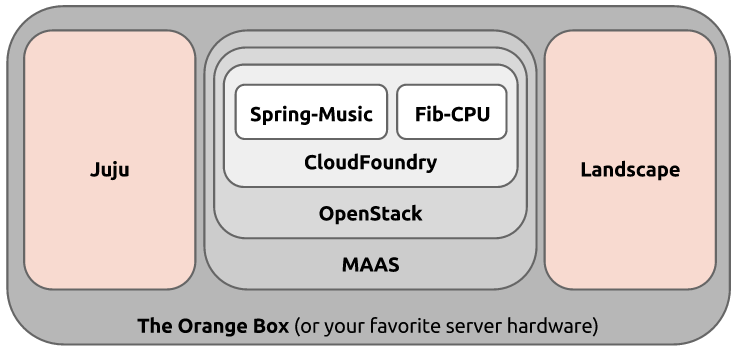
What would you say if I told you, that you could continuously upload your own Software-as-a-Service  (SaaS) web apps into an open source Platform-as-a-Service (PaaS) framework, running on top of an open source Infrastructure-as-a-Service (IaaS) cloud, deployed on an open source Metal-as-a-Service provisioning system, autonomically managed by an open source Orchestration-Service… right now, today?

“An idea is resilient. Highly contagious. Once an idea has taken hold of the brain it's almost impossible to eradicate.”

“Now, before you bother telling me it's impossible…”

“No, it's perfectly possible. It's just bloody difficult.” 

Perhaps something like this...

“How could I ever acquire enough detail to make them think this is reality?”

“Don’t you want to take a leap of faith???”
Sure, let's take a look!

Okay, this looks kinda neat, what is it?

This is an open source Java Spring web application, called Spring-Music, deployed as an app, running inside of Linux containers in CloudFoundry


Cloud Foundry?

CloudFoundry is an open source Platform-as-a-Service (PAAS) cloud, deployed into Linux virtual machine instances in OpenStack, by Juju.


OpenStack?

Juju?

OpenStack is an open source Infrastructure-as-a-Service (IAAS) cloud, deployed by Juju and Landscape on top of MAAS.

Juju is an open source Orchestration System that deploys and scales complex services across many public clouds, private clouds, and bare metal servers.

Landscape?

MAAS?

Landscape is a systems management tool that automates software installation, updates, and maintenance in both physical and virtual machines. Oh, and it too is deployed by Juju.

MAAS is an open source bare metal provisioning system, providing a cloud-like API to physical servers. Juju can deploy services to MAAS, as well as public and private clouds.

"Ready for the kick?"

If you recall these concepts of nesting cloud technologies...

These are real technologies, which exist today!

These are Software-as-a-Service  (SaaS) web apps served by an open source Platform-as-a-Service (PaaS) framework, running on top of an open source Infrastructure-as-a-Service (IaaS) cloud, deployed on an open source Metal-as-a-Service provisioning system, managed by an open source Orchestration-Service.

Spring Music, served by CloudFoundry, running on top of OpenStack, deployed on MAAS, managed by Juju and Landscape!

“The smallest seed of an idea can grow…”

Oh, and I won't leave you hanging...you're not dreaming!


:-Dustin

Wednesday, September 3, 2014

OpenStack Austin Meetup, with an Orange Box and Home Brew Beer!


In case you missed the recent Cloud Austin MeetUp, you have another chance to see the Ubuntu Orange Box live and in action here in Austin!

This time, we're at the OpenStack Austin MeetUp, next Wednesday, September 10, 2014, at 6:30pm at Tech Ranch Austin, 9111 Jollyville Rd #100, Austin, TX!

If you join us, you'll witness all of OpenStack Ice House, deployed in minutes to real hardware. Not an all-in-one DevStack; not a minimum viable set of components.  Real, rich, production-quality OpenStack!  Ceilometer, Ceph, Cinder, Glance, Heat, Horizon, Keystone, MongoDB, MySQL, Nova, NTP, Quantum, and RabbitMQ -- intelligently orchestrated and rapidly scaled across 10 physical servers sitting right up front on the podium.  Of course, we'll go under the hood and look at how all of this comes together on the fabulous Ubuntu Orange Box.

And like any good open source software developer, I generally like to make things myself, and share them with others.  In that spirit, I'll also bring a couple of growlers of my own home brewed beer, Ubrewtu ;-)  Free as in beer, of course!
Cheers,Dustin

Thursday, July 31, 2014

Ubuntu OpenStack on an Orange Box, Live Demo at the Cloud Austin Meetup, August 19th


I hope you'll join me at Rackspace on Tuesday, August 19, 2014, at the Cloud Austin Meetup, at 6pm, where I'll use our spectacular Orange Box to deploy Hadoop, scale it up, run a terasort, destroy it, deploy OpenStack, launch instances, and destroy it too.  I'll talk about the hardware (the Orange Box, Intel NUCs, Managed VLAN switch), as well as the software (Ubuntu, OpenStack, MAAS, Juju, Hadoop) that makes all of this work in 30 minutes or less!

Be sure to RSVP, as space is limited.

http://www.meetup.com/CloudAustin/events/194009002/

Cheers,
Dustin

Thursday, July 10, 2014

Scalable, Parallel Video Transcoding on Ubuntu

Transcoding video is a very resource intensive process.

It can take many minutes to process a small, 30-second clip, or even hours to process a full movie.  There are numerous, excellent, open source video transcoding and processing tools freely available in Ubuntu, including libav-toolsffmpegmencoder, and handbrake.  Surprisingly, however, none of those support parallel computing easily or out of the box.  And disappointingly, I couldn't find any MPI support readily available either.

I happened to have an Orange Box for a few days recently, so I decided to tackle the problem myself, and develop a scalable, parallel video transcoding solution myself.  I'm delighted to share the result with you today!

When it comes to commercial video production, it can take thousands of machines, hundreds of compute hours to render a full movie.  I had the distinct privilege some time ago to visit WETA Digital in Wellington, New Zealand and tour the render farm that processed The Lord of the Rings triology, Avatar, and The Hobbit, etc.  And just a few weeks ago, I visited another quite visionary, cloud savvy digital film processing firm in Hollywood, called Digital Film Tree.

Windows and Mac OS may be the first platforms that come to mind, when you think about front end video production, Linux is far more widely used for batch video processing, and with Ubuntu, in particular, being extensively at both WETA Digital and Digital Film Tree, among others.

While I could have worked with any of a number of tools, I settled on avconv (the successor(?) of ffmpeg), as it was the first one that I got working well on my laptop, before scaling it out to the cluster.

I designed an approach on my whiteboard, in fact quite similar to some work I did parallelizing and scaling the john-the-ripper password quality checker.

At a high level, the algorithm looks like this:
  1. Create a shared network filesystem, simultaneously readable and writable by all nodes
  2. Have the master node split the work into even sized chunks for each worker
  3. Have each worker process their segment of the video, and raise a flag when done
  4. Have the master node wait for each of the all-done flags, and then concatenate the result
And that's exactly what I implemented that in a new transcode charm and transcode-cluster bundle.  It provides linear scalability and performance improvements, as you add additional units to the cluster.  A transcode job that takes 24 minutes on a single node, is down to 3 minutes on 8 worker nodes in the Orange Box, using Juju and MAAS against physical hardware nodes.


For the curious, the real magic is in the config-changed hook, which has decent inline documentation.


The trick, for anyone who might make their way into this by way of various StackExchange questions and (incorrect) answers, is in the command that splits up the original video (around line 54):

avconv -ss $start_time -i $filename -t $length -s $size -vcodec libx264 -acodec aac -bsf:v h264_mp4toannexb -f mpegts -strict experimental -y ${filename}.part${current_node}.ts

And the one that puts it back together (around line 72):

avconv -i concat:"$concat" -c copy -bsf:a aac_adtstoasc -y ${filename}_${size}_x264_aac.${format}

I found this post and this documentation particularly helpful in understanding and solving the problem.

In any case, once deployed, my cluster bundle looks like this.  8 units of transcoders, all connected to a shared filesystem, and performance monitoring too.


I was able to leverage the shared-fs relation provided by the nfs charm, as well as the ganglia charm to monitor the utilization of the cluster.  You can see the spikes in the cpu, disk, and network in the graphs below, during the course of a transcode job.


For my testing, I downloaded the movie Code Rushfreely available under the CC-BY-NC-SA 3.0 license.  If you haven't seen it, it's an excellent documentary about the open source software around Netscape/Mozilla/Firefox and the dotcom bubble of the late 1990s.

Oddly enough, the stock, 746MB high quality MP4 video doesn't play in Firefox, since it's an mpeg4 stream, rather than H264.  Fail.  (Yes, of course I could have used mplayer, vlc, etc., that's not the point ;-)


Perhaps one of the most useful, intriguing features of HTML5 is it's support for embedding multimedia, video, and sound into webpages.  HTML5 even supports multiple video formats.  Sounds nice, right?  If it only were that simple...  As it turns out, different browsers have, and lack support for the different formats.  While there is no one format to rule them all, MP4 is supported by the majority of browsers, including the two that I use (Chromium and Firefox).  This matrix from w3schools.com illustrates the mess.

http://www.w3schools.com/html/html5_video.asp

The file format, however, is only half of the story.  The audio and video contents within the file also have to be encoded and compressed with very specific codecs, in order to work properly within the browsers.  For MP4, the video has to be encoded with H264, and the audio with AAC.

Among the various brands of phones, webcams, digital cameras, etc., the output format and codecs are seriously all over the map.  If you've ever wondered what's happening, when you upload a video to YouTube or Facebook, and it's a while before it's ready to be viewed, it's being transcoded and scaled in the background. 

In any case, I find it quite useful to transcode my videos to MP4/H264/AAC format.  And for that, a scalable, parallel computing approach to video processing would be quite helpful.

During the course of the 3 minute run, I liked watching the avconv log files of all of the nodes, using Byobu and Tmux in a tiled split screen format, like this:


Also, the transcode charm installs an Apache2 webserver on each node, so you can expose the service and point a browser to any of the nodes, where you can find the input, output, and intermediary data files, as well as the logs and DONE flags.


Once the job completes, I can simply click on the output file, Code_Rush.mp4_1280x720_x264_aac.mp4, and see that it's now perfectly viewable in the browser!


In case you're curious, I have verified the same charm with a couple of other OGG, AVI, MPEG, and MOV input files, too.


Beyond transcoding the format and codecs, I have also added configuration support within the charm itself to scale the video frame size, too.  This is useful to take a larger video, and scale it down to a more appropriate size, perhaps for a phone or tablet.  Again, this resource intensive procedure perfectly benefits from additional compute units.


File format, audio/video codec, and frame size changes are hardly the extent of video transcoding workloads.  There are hundreds of options and thousands of combinations, as the manpages of avconv and mencoder attest.  All of my scripts and configurations are free software, open source.  Your contributions and extensions are certainly welcome!

In the mean time, I hope you'll take a look at this charm and consider using it, if you have the need to scale up your own video transcoding ;-)

Cheers,
Dustin

Monday, June 23, 2014

The Yo Charm. It's that simple.

It's that simple.
It was about 4pm on Friday afternoon, when I had just about wrapped up everything I absolutely needed to do for the day, and I decided to kick back and have a little fun with the remainder of my work day.

 It's now 4:37pm on Friday, and I'm now done.

Done with what?  The Yo charm, of course!

The Internet has been abuzz this week about the how the Yo app received a whopping $1 million dollars in venture funding.  (Forbes notes that this is a pretty surefire indication that there's another internet bubble about to burst...)

It's little more than the first program any kid writes -- hello world!

Subsequently I realized that we don't really have a "hello world" charm.  And so here it is, yo.

$ juju deploy yo

Deploying up a webpage that says "Yo" is hardly the point, of course.  Rather, this is a fantastic way to see the absolute simplest form of a Juju charm.  Grab the source, and go explore it yo-self!

$ charm-get yo
$ tree yo
├── config.yaml
├── copyright
├── hooks
│   ├── config-changed
│   ├── install
│   ├── start
│   ├── stop
│   ├── upgrade-charm
│   └── website-relation-joined
├── icon.svg
├── metadata.yaml
└── README.md
1 directory, 11 files


  • The config.yaml let's you set and dynamically changes the service itself (the color and size of the font that renders "Yo").
  • The copyright is simply boilerplate GPLv3
  • The icon.svg is just a vector graphics "Yo."
  • The metadata.yaml explains what this charm is, how it can relate to other charms
  • The README.md is a simple getting-started document
  • And the hooks...
    • config-changed is the script that runs when you change the configuration -- basically, it uses sed to inline edit the index.html Yo webpage
    • install simply installs apache2 and overwrites /var/www/index.html
    • start and stop simply starts and stops the apache2 service
    • upgrade-charm is currently a no-op
    • website-relation-joined sets and exports the hostname and port of this system
The website relation is very important here...  Declaring and defining this relation instantly lets me relate this charm with dozens of other services.  As you can see in the screenshot at the top of this post, I was able to easily relate the varnish website accelerator in front of the Yo charm.

Hopefully this simple little example might help you examine the anatomy of a charm for the first time, and perhaps write your own first charm!

Cheers,

Dustin

Tuesday, May 13, 2014

The Orange Box: Cloud for the Free Man

It was September of 2009.  I answered a couple of gimme trivia questions and dropped my business card into a hat at a Linux conference in Portland, Oregon.  A few hours later, I received an email...I had just "won" a developer edition HTC Dream -- the Android G1.  I was quite anxious to have a hardware platform where I could experiment with Android.  I had, of course, already downloaded the SDK, compiled Android from scratch, and fiddled with it in an emulator.  But that experience fell far short of Android running on real hardware.  Until the G1.  The G1 was the first device to truly showcase the power and potential of the Android operating system.

And with that context, we are delighted to introduce the Orange Box!


The Orange Box


Conceived by Canonical and custom built by TranquilPC, the Orange Box is a 10-node cluster computer, that fits in a suitcase.

Ubuntu, MAAS, Juju, Landscape, OpenStack, Hadoop, CloudFoundry, and more!

The Orange Box provides a spectacular development platform, showcasing in mere minutes the power of hardware provisioning and service orchestration with Ubuntu, MAAS, Juju, and Landscape.  OpenStack, Hadoop, CloudFoundry, and hundreds of other workloads deploy in minutes, to real hardware -- not just instances in AWS!  It also makes one hell of a Steam server -- there's a charm for that ;-)


OpenStack deployed by Juju, takes merely 6 minutes on an Orange Box

Most developers here certainly recognize the term "SDK", or "Software Development Kit"...  You can think of the Orange Box as a "HDK", or "Hardware Development Kit".  Pair an Orange Box with MAAS and Juju, and you have yourself a compact cloud.  Or a portable big data number cruncher.  Or a lightweight cluster computer.


The underside of an Orange Box, with its cover off


Want to get your hands on one?

Drop us a line, and we'd be delighted to hand-deliver an Orange Box to your office, and conduct 2 full days of technical training, covering MAAS, Juju, Landscape, and OpenStack.  The box is yours for 2 weeks, as you experiment with the industry leading Ubuntu ecosystem of cloud technologies at your own pace and with your own workloads.  We'll show back up, a couple of weeks later, to review what you learned and discuss scaling these tools up, into your own data center, on your own enterprise hardware.  (And if you want your very own Orange Box to keep, you can order one from our friends at TranquilPC.)


Manufacturers of the Orange Box

Gear head like me?  Interested in the technical specs?


Remember those posts late last year about Intel NUCs?  Someone took notice, and we set out to build this ;-)


Each Orange Box chassis contains:
  • 10x Intel NUCs
  • All 10x Intel NUCs contain
    • Intel HD Graphics 4000 GPU
    • 16GB of DDR3 RAM
    • 120GB SSD root disk
    • Intel Gigabit ethernet
  • D-Link DGS-1100-16 managed gigabit switch with 802.1q VLAN support
    • All 10 nodes are internally connected to this gigabit switch
  • 100-240V AC/DC power supply
    • Adapter supplied for US, UK, and EU plug types
    • 19V DC power supplied to each NUC
    • 5V DC power supplied to internal network switch


Intel NUC D53427RKE board

That's basically an Amazon EC2 m3.xlarge ;-)

The first node, node0, additionally contains:
  • A 2TB Western Digital HDD, preloaded with a full Ubuntu archive mirror
  • USB and HDMI ports are wired and accessible from the rear of the box

Most planes fly in clouds...this cloud flies in planes!


In aggregate, this micro cluster effectively fields 40 cores, 160GB of RAM, 1.2TB of solid state storage, and is connected over an internal gigabit network fabric.  A single fan quietly cools the power supply, while all of the nodes are passively cooled by aluminum heat sinks spanning each side of the chassis. All in a chassis the size of a tower PC!

It fits in a suit case, and can travel anywhere you go.


Pelican iM2875 Storm Case

How are we using them at Canonical?

If you're here at the OpenStack Summit in Atlanta, GA, you'll see at least a dozen Orange Boxes, in our booth, on stage during Mark Shuttleworth's keynote, and in our breakout conference rooms.


Canonical sales engineer, Ameet Paranjape,
demonstrating OpenStack on the Orange Box in the Ubuntu booth
at the OpenStack Summit in Atlanta, GA
We are also launching an update to our OpenStack Jumpstart program, where we'll deliver and Orange Box and 2 full days of training to your team, and leave you the box while you experiment with OpenStack, MAAS, Juju, Hadoop, and more for 2 weeks.  Without disrupting your core network or production data center workloads,  prototype your OpenStack experience within a private sandbox environment. You can experiment with various storage alternatives, practice scaling services, destroy and rebuild the environment repeatedly. Safe. Risk free.


This is Cloud, for the Free Man.

:-Dustin

Printfriendly